Apps for the new alphabet
Everything for writing with Ö, Ğ, Ş, Ç: an app that converts documents, keyboard layouts and an add-in for Word.
The Yangi alifbo app
It rewrites Word documents from old Latin and Cyrillic in the new alphabet: Ö, Ğ, Ş, Ç. Install it on your device, or stay on the web and convert them in this browser.
- AndroidPhones and tabletsAPK
- WindowsWindows 10 and 11ZIP
- macOSMacZIP
- LinuxUbuntu, Fedora and othersTAR.GZ
- iOSiPhone and iPadComing soon
All versions and install notes on GitHub
Stay on the web
Convert documents right here in the browser. Nothing to install, and no document leaves your device.
Keyboard layouts
Type ö, ş, ğ, ç and the ʼ and ʻ signs straight from the keyboard. There are three layouts, which differ only in which keys those letters are on.
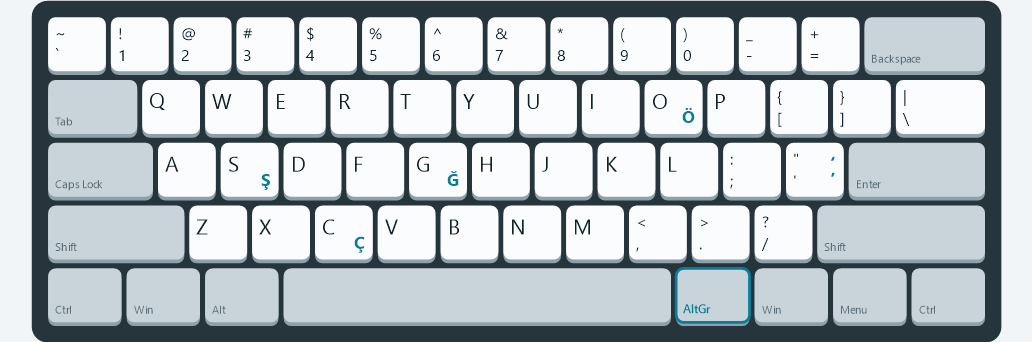
Every key stays where it is on a US keyboard, and the Uzbek letters are typed with AltGr.
- öAltGr+O
- şAltGr+S
- ğAltGr+G
- çAltGr+C
Each key shows what it types alone (bottom left), with Shift (top left), with AltGr (bottom right) and with AltGr+Shift (top right). AltGr is the right Alt. Blue keys type something different from a US keyboard. On a Mac, press Option (⌥) where it says AltGr.
Word add-in
Adds a Yangi alifbo tab to Word. Before anything changes, it highlights every spot it will convert, so you can check them first.
How it works
- Körib çiqiş highlights every spot it will convert.
- Remove the highlight from anything you want to keep as it is.
- Qöllaş converts the rest. One Ctrl+Z undoes it all.